


Better Cleaner app icon

Local storage management for macOS · Coming soon · Free scanning with a monthly cleanup allowance

Better Cleaner

Scan cleanup candidates, large files, duplicates, and similar images in folders you explicitly authorize. Review the evidence first, then only confirmed items move to the macOS Trash.

macOS 14 or later · Version 1.0.0

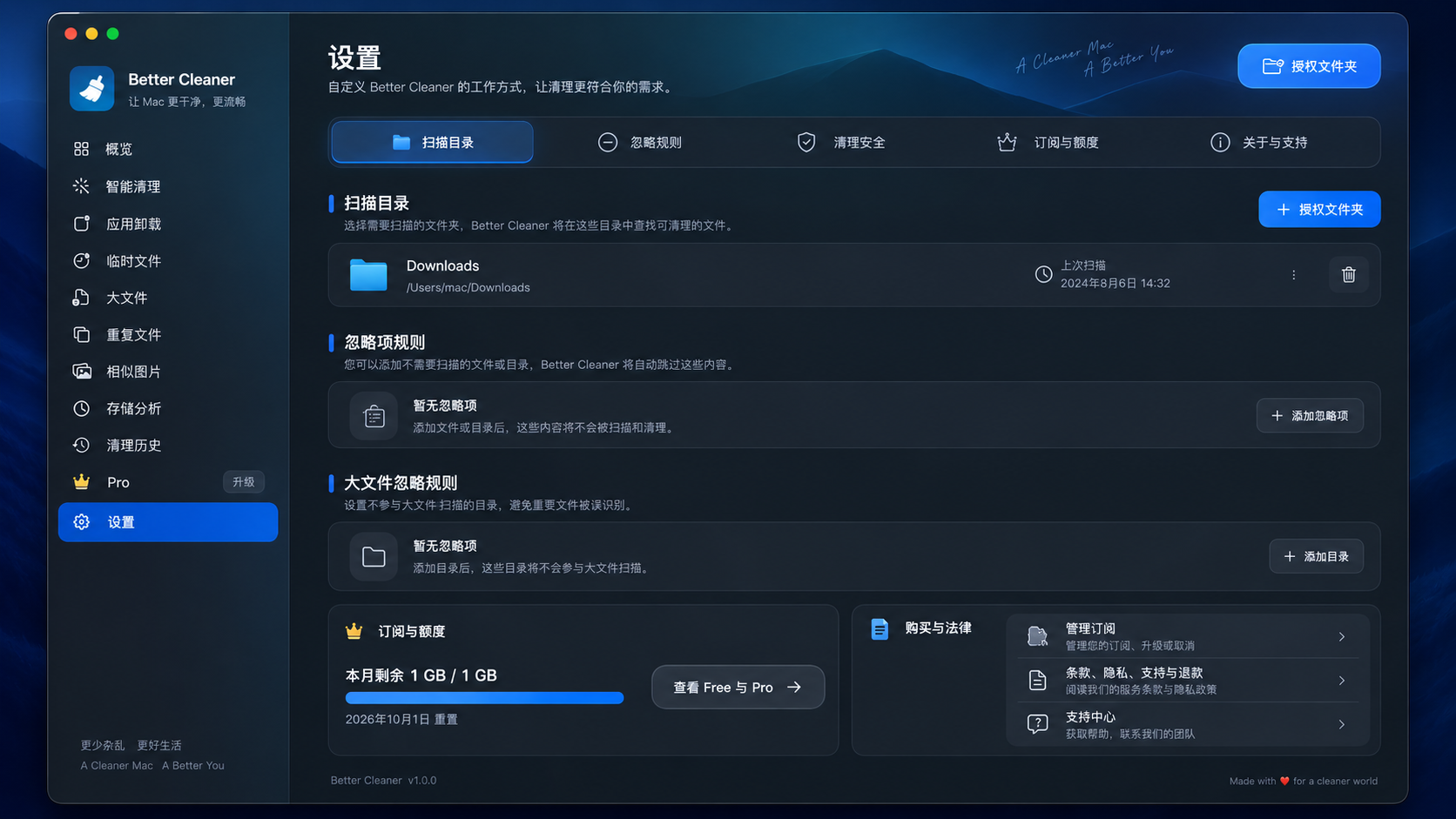
Better Cleaner development-build Settings page showing authorized folders, ignore rules, cleanup safety, and allowance controls.

Authorized scopeOnly folders you select are scanned, and you can remove access at any time in Settings.

Review before cleanupCandidates require your confirmation; duplicate files and similar images are not selected by default.

Local processingScanning, comparison, and cleanup run on your Mac without uploading file contents.

Trash and receiptsCleanup moves items to the macOS Trash and records outcomes and failure reasons.

Three pillars

From choosing folders through review, confirmation, and receipts, every cleanup stays on your Mac and within the scope you control.

01

Start with authorized folders

Temporary files, large files, duplicates, similar images, and storage analysis all stay within the scope you grant.

  • Find what uses space by size and file type
  • Verify exact duplicates with SHA-256 and byte-by-byte comparison
  • Group similar images, then choose which original to keep
02

Review apps and leftovers by evidence

Inspect evidence, shared status, and protected boundaries for installed apps and related items before deciding what to handle.

  • Does not promise to find every leftover
  • Does not make protected items cleanable
  • Requires review before handling apps or related items
03

Check before and after execution

Revalidate file identity and path safety before execution, then retain local receipts, failure reasons, and recovery entry points.

  • Never deletes files automatically
  • Moves items to the macOS Trash rather than erasing them permanently
  • Emptying the Trash can still make an item unrecoverable

Development preview

Development preview

The Settings page shows authorized scan folders, ignore rules, cleanup safety, allowance, and support entry points. The interface and capabilities may change before the App Store release.

Development build

This is a current development-interface preview, not an App Store listing screenshot; the interface may change before release.

Pages and entry points

Pages and operation paths

From Overview and Smart Cleanup through History and Settings, each surface stays within the folders you authorize.

  • Overview and Smart Cleanup · Review reclaimable space, candidates, and risk levels before you decide whether to enter review.
  • Temporary files, large files, and duplicates · Inspect candidates by rule, size, or locally verified identical content.
  • Similar images and Storage Analysis · Group similar photos, or read storage through directory trees, charts, and type distribution.
  • App uninstall and leftovers · Review evidence for an app bundle, related files, shared items, and protected boundaries.
  • Cleanup History and Settings · Read local receipts, failure reasons, and recovery entry points; manage folder access, ignore rules, and support.
01Overview and Smart Cleanup02Temporary files, large files, and duplicates03Similar images and Storage Analysis04App uninstall and leftovers05Cleanup History and Settings

Privacy & authorization

Files stay on your Mac

Scanning, comparison, and cleanup run locally. The app accesses only folders you authorize through the system picker; file contents, filenames, paths, and security-scoped bookmarks do not leave the device during ordinary scanning or cleanup.

  • Does not scan the whole disk, system caches, system logs, or unauthorized locations
  • No advertising, tracking, or automatic crash reporting
  • Optional support sends only what you submit, plus attachments you preview and consent to separately
  • Apple handles StoreKit purchase and restore; direct website sales are not available
Read the privacy policy
Authorized foldersLocal scanningConfirmed cleanupTrash and receiptsFree allowanceOptional support

Free and Pro

Scan for free first, then decide whether you need more cleanup allowance

Scanning, results, and Storage Analysis are free and unlimited. Cleanup allowance is measured per local calendar month for the current Mac user.

Free

Free

No account required

  • Unlimited scanning, results, and Storage Analysis
  • Up to 1,000,000,000 bytes of cleanup in each local calendar month
  • Multiple cleanup actions share one allowance; it is not 1 GB per cleanup
  • When allowance is insufficient, the batch does not run partially or silently

Moving items to Trash counts toward cleanup allowance, while disk space is generally not reclaimed until you empty the Trash.

Boundaries

What this release does not promise

  • It is not a whole-disk or system-level junk cleaner, and it does not promise every app leftover.
  • It does not bypass macOS permissions, system protection, or security-scoped folder authorization.
  • It does not delete automatically, erase files permanently, or guarantee recovery of every item moved to Trash.
  • There is no website purchase flow, App Store download, or purchase entry before release.

Frequently asked questions

Frequently asked questions

Why do I choose folders?

Better Cleaner scans only the scope you explicitly grant through the system picker. You can remove that access in Settings, and the app does not expand it to the whole disk.

How are duplicate files identified?

It compares SHA-256 first, then confirms bytes directly. You still review every group before cleanup, and at least one copy is kept.

Are similar images deleted automatically?

No. Similar images are grouped only. You must explicitly choose an original to keep, and candidates still need confirmation before execution.

Does cleanup delete permanently?

No. Confirmed items move to the macOS Trash rather than being erased. They can generally be restored through macOS until the Trash is emptied.

How does the free allowance work?

Scanning and analysis are unlimited. The current Mac user gets a shared 1,000,000,000-byte cleanup allowance for each local calendar month, not a new 1 GB allowance for every cleanup.

Can I download Better Cleaner now?

Coming soon. This page will show the official way to get it after release; until then, use the support page to ask a question.

Need help?

Read about folder authorization, scan results, and Trash boundaries first. If you still need help, send text feedback to Better Cleaner Support.