Better Calc Pro app icon

macOS calculator workbench

Better Calc Pro

A calculator for the Mac that keeps the whole calculation on screen: a multi-line worksheet with line references and variables, basic / scientific / programmer keypads, Chinese natural-language input, unit and European Central Bank currency conversion, a formula library, a ⌘K command palette, Quick Calculate from the menu bar, and a pinnable compact calculator that reads arithmetic from the clipboard.

Available now · Free · macOS 15 or later · Version 1.0.0 · Free

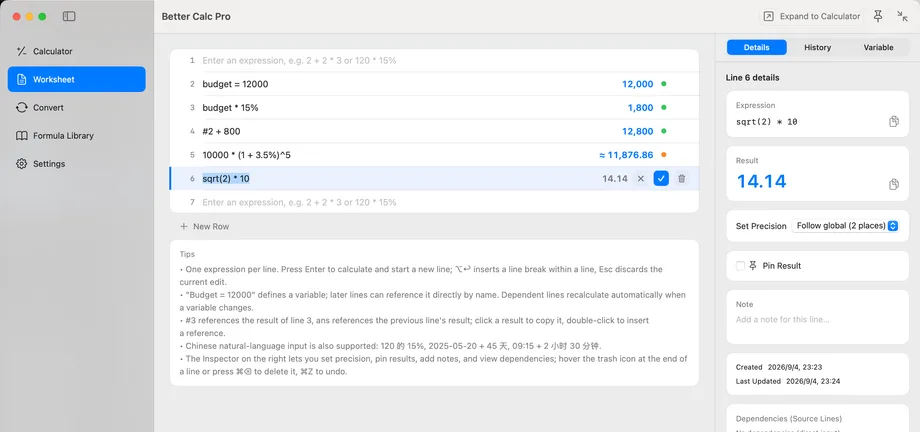
Better Calc Pro Worksheet page showing a budget variable, a #2 line reference, a percentage and a compound-interest line with live results, and the inspector with the current line's expression, result, precision, and note
Worksheet page · Better Calc Pro

Local by defaultNo account, no sign-in, no analytics, no ads, no trackers; worksheets, history, variables, formulas, and settings live as JSON inside the app sandbox container on your Mac.

One network requestOnly when you open currency conversion or refresh rates does the app contact the European Central Bank reference-rate service, and the request carries nothing but the base currency code; rates are cached with a timestamp.

Results you can checkValues are held as Decimal at full precision and formatted only for display; copy the displayed value or the full-precision value, and the difference is always visible.

No permissions requestedNo Accessibility, Screen Recording, or Full Disk Access; the clipboard is read only while you have pinned the window, and only its arithmetic part is used.

Three pillars

Calculate line by line with every value in between still on screen; three keypads share one full-precision Decimal engine.

01

Worksheet

Type an expression, press Return, and the result appears beside it while the next line opens; a dim live preview follows along as you type.

  • Refer to an earlier result by its line number, such as #3, or double-click a result to insert the reference
  • Name a value once, budget = 12000, and reuse it anywhere; change one input and only the lines that depend on it recalculate
  • Pin, annotate, or delete any line; undo covers all of it
02

Three keypads, one engine

Switch between the basic, scientific, and programmer keypads with ⌘1 / ⌘2 / ⌘3, and type straight from the physical keyboard.

  • Basic: arithmetic, parentheses, percentages, and ANS for the previous result
  • Scientific: trigonometry and inverses, log / ln / log2 / log10, powers and roots, factorial, combinations and permutations, constants, and DEG / RAD / GRAD
  • Programmer: BIN / OCT / DEC / HEX shown together, 8/16/32/64-bit widths, signed and unsigned, bitwise operations, shifts and rotates, with both the truncated and the original result on overflow
03

Convert, formulas, and Chinese

Unit and European Central Bank currency conversion, a library of 23 built-in formulas, and everyday Chinese phrasings understood directly.

  • Length, weight, area, volume, temperature, time, data, speed, pressure, energy, power, and more; send a conversion into the worksheet at full precision
  • Formulas across finance, tax, date and time, health, and programming; insert one and tab through its parameters, or write your own
  • Questions like 120 的 15% 是多少 and date arithmetic such as 2026-08-27 + 45 天 work directly; anything unrecognized falls back to ordinary parsing, with no cloud model involved

Privacy & security

Data stays on this Mac

Better Calc Pro has no account, no sign-in, and no analytics, advertising, tracking, or crash-reporting component. Worksheets, history, variables, formulas, and settings are stored as JSON inside the app sandbox container on your Mac, and preferences in UserDefaults. The one network request happens when you open currency conversion or refresh rates: it goes to the European Central Bank reference-rate service at api.frankfurter.dev and carries only the base currency code, with no identifiers, device information, or user content.

  • No system permissions are requested: no Accessibility, Screen Recording, Full Disk Access, or Automation
  • The clipboard is read only while you have pinned the window, and only its arithmetic part is used; dates, phone numbers, times, IP addresses, and version strings are ignored, and nothing is stored, logged, or transmitted
  • Exchange rates are cached on your Mac with a timestamp; offline, the last successful rates are reused and labelled as cached
  • No iCloud sync, no account, and no companion app on any other device
Read the privacy policy
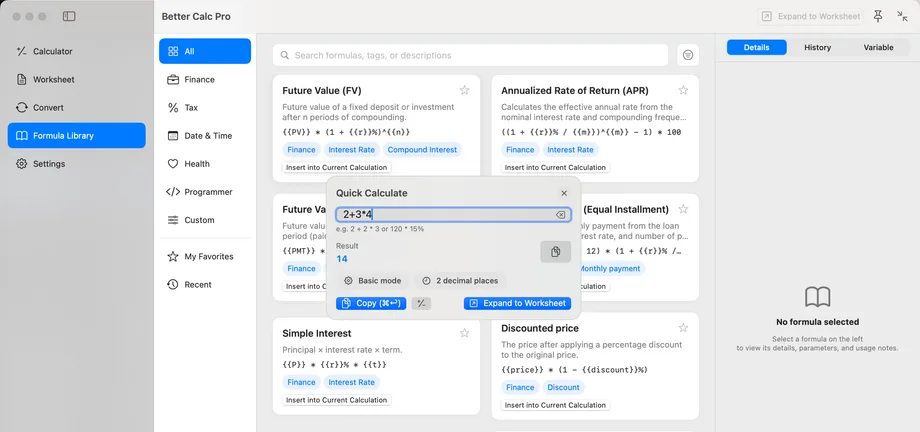
Better Calc Pro Quick Calculate panel floating over the Formula Library, showing a typed expression, its result, the Basic mode and precision hints, and the Copy and Expand to Worksheet buttons

Pages

Pages and entry points

Four sidebar pages, plus panels and modes you can call up at any time.

  • Calculator · The default page: expression and live result, ⌘1 / ⌘2 / ⌘3 to switch keypads, ↑ ↓ through history
  • Worksheet · Multi-line calculation with line references, variables, live preview, and dependent recalculation
  • Convert · Unit categories and currency conversion with the source and update time on screen; ⌘↩ sends the result to the worksheet
  • Formula Library · Built-in and custom formulas: search, filter, double-click to insert, Tab between parameters
  • Command Palette · ⌘K searches pages, actions, and modes with fuzzy matching
  • Quick Calculate · Drops down from the menu bar or the global hotkey ⌥⌘K: type, press Return, and the result is copied as the panel closes
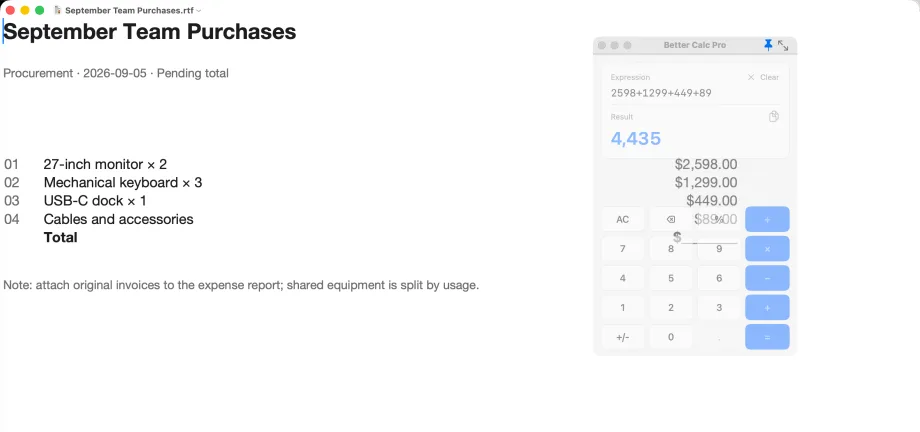
  • Compact pinned mode · ⌥⌘U shrinks it to a mini window with only the display and keypad; ⌥⌘P pins it above other apps, and when unfocused it turns translucent so the document beneath stays readable and clicks pass through
  • Settings · Precision, default page and calculation mode, exchange-rate refresh, hotkey recording, interface mode, and theme
The pinned Better Calc Pro compact calculator turned translucent after losing focus, with the amounts in the document underneath clearly visible through the window while clicks pass through to the document

Help

Frequently asked questions

How do line references and variables work in the worksheet?

Refer to the result of line 3 as #3, or double-click any result to insert the reference. Writing budget = 12000 defines a variable that later lines use by name. When you change an input, only the lines that depend on it recalculate.

Is the displayed result the same as the copied one?

Values are held internally as Decimal at full precision and formatted for display according to your precision setting. You can copy the displayed value, or copy the full-precision value from the context menu or the inspector; the difference is always visible.

Where do exchange rates come from, and do they work offline?

Rates are European Central Bank reference rates fetched from api.frankfurter.dev, and the request carries only the base currency code. The first fetch needs a connection; after that the last successful rates are reused and labelled with their timestamp, and the interface says whether the figure is live or cached. Unit conversion is entirely local.

Does Better Calc Pro read my clipboard?

Only while you have switched on Pin on Top (⌥⌘P) in the compact calculator, and only the arithmetic part is used: digits, operators, parentheses, and decimal separators. Dates, phone numbers, times, IP addresses, and version strings are discarded rather than guessed at. Turning off Pin on Top stops it immediately, and clipboard content is never stored, logged, or transmitted.

Does the pinned mini window block what is underneath it?

No. Once pinned with ⌥⌘P, the compact calculator turns translucent whenever it is not in front, so the document or web page beneath it stays readable through the window and clicks pass straight through to that window. To type again, click its title bar or press ⌥⌘K to hand focus back, and the window is opaque again at once.

Which system permissions does it need?

None. No Accessibility, Screen Recording, Full Disk Access, or Automation. The global hotkey (⌥⌘K by default, re-recordable in Settings) is registered through a system API that needs no Accessibility trust and never observes keystrokes outside the app's own windows.

Can I ask in Chinese?

Yes. Low-ambiguity Chinese phrasings such as 120 的 15% 是多少, 2026-08-27 + 45 天, and 09:15 + 2 小时 30 分钟 are calculated directly; anything unrecognized falls back to ordinary expression parsing with a clear syntax error. No cloud model is involved, so it works offline.

Is there iCloud sync or a version for another platform?

No. Everything stays on this Mac: no iCloud sync, no account, and no companion app on any other device. The app also does not plot functions, solve equations, or support RPN input.

Can I use Better Calc Pro now?

Yes. It is available now and ready to use.

Does Better Calc Pro cost anything?

It is free, with no in-app purchases or subscription.

Need help?

Read the product guides, or reach us through the support center and email.