
Better Moment app icon

iPhone photo organizer · Available now · Free to download

Better Moment

Keep the moments that matter.

Bring duplicate, similar, and blurry photos together. Compare at your own pace and keep your favorites. Every feature is free; Pro only removes deletion limits.

All features free · Pro removes deletion limits onlyCompare pricing & benefits ↓

iOS 18 / iPadOS 18 or later · iPhone and iPad · Version 1.0.0 · net.better.mac.moment

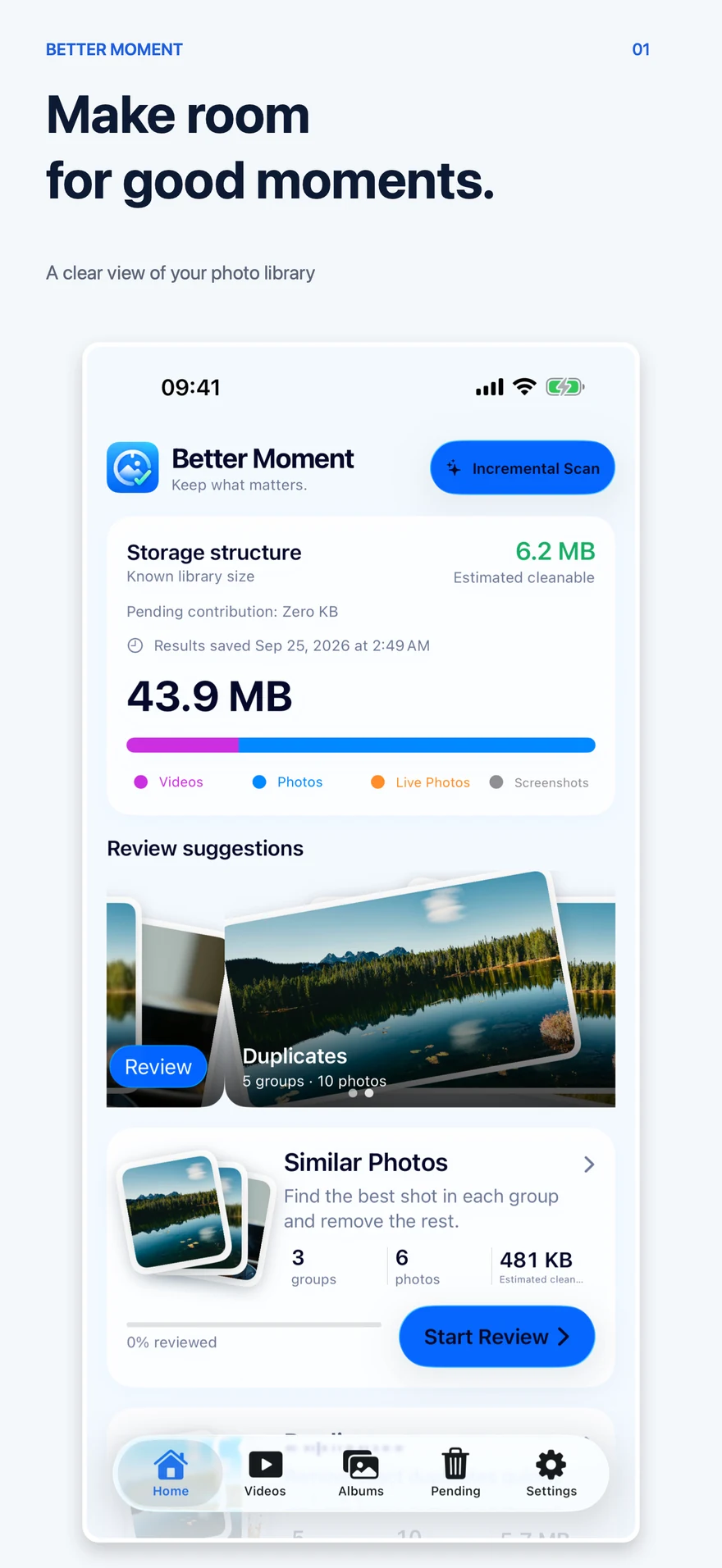
Better Moment library overview: storage for photos, videos, and Live Photos, with suggestions for reviewing duplicates and similar photos
Official App Store screenshot · library overview

On-device analysisApple's own frameworks analyze your library on the device, with no photo upload and no account.

Review before deleteMarked photos go to Pending first; after you confirm, Photos asks once more.

Always protectedFavorites and the last remaining photo in a group are never deleted.

Free featuresEvery feature is free; Pro only lifts the daily and monthly deletion limits.

Interface languagesSimplified Chinese · Traditional Chinese · English · Japanese · Korean

Capabilities

From scan to deletion, every step is your decision.

01

Smart Scan

Scan the photos you allow and sort out duplicates, similar shots, blurry and low-quality photos, screenshots, selfies, Live Photos, and large photos.

  • Similar and duplicate shots are grouped
  • ID documents, receipts, and QR codes get their own category for manual review
  • Cloud-only originals are not downloaded automatically
02

Group-by-group review

Compare similar and duplicate shots one group at a time, and go through other categories photo by photo or in a grid; keep, delete, or decide later.

  • Marked photos collect in Pending for one confirmation
  • Drafts save automatically and undo is one tap away
  • Play videos one at a time before deciding
03

Albums and highlights

Build albums from your selections, get album suggestions based on when and where photos were taken, and organize documents and receipts by date.

  • You review smart album suggestions before they are created
  • Your Highlights keeps the moments you love
  • Search, sort, and create albums

A review flow that keeps you in control

Compare first. Confirm later. You decide each step.

Better Moment turns scan results into a reviewable process instead of cleaning your library automatically.

01

Find what is worth reviewing

Browse duplicates, similar shots, blurry photos, screenshots, selfies, Live Photos, and large photos. Analysis only covers the library you allow.

02

Compare each group and choose what stays

Review similar photos side by side. Keep them, mark them for deletion, or decide later; your draft saves automatically.

03

Review everything before removal

Marked items collect in Pending. After you confirm, Photos asks for authorization and moves deleted items to Recently Deleted.

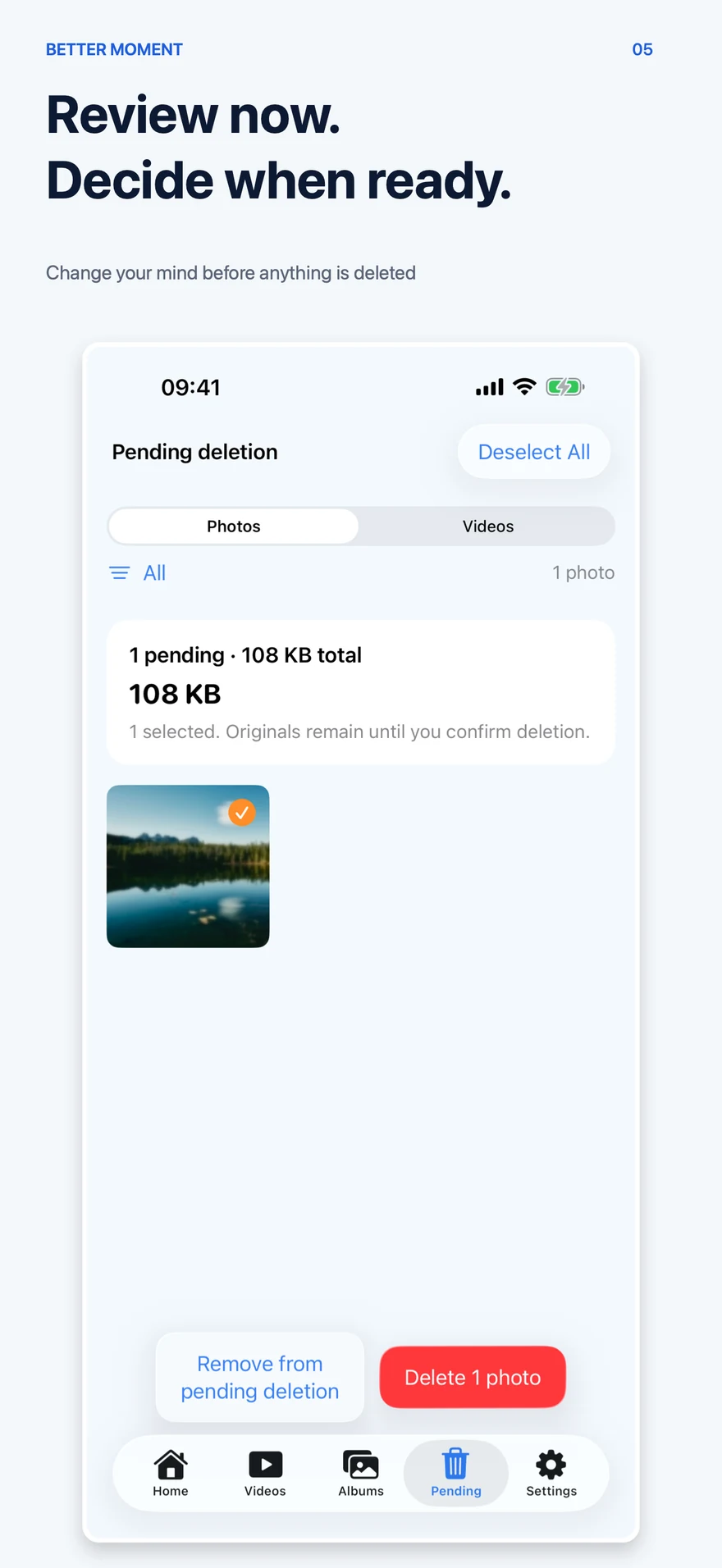
Better Moment Pending deletion: review marked photos and their size or remove them from the list; originals remain until deletion is confirmed
Review now, decide when ready

Privacy & local processing

Your photos stay on your device

Better Moment analyzes on the device: there is no account, no server-side processing, and no photo upload. Cloud-only originals stay in iCloud until you explicitly choose to download them.

  • Photo analysis runs locally with Apple's own frameworks
  • Every deletion needs your confirmation and Photos authorization
  • Deleted items go to Recently Deleted and can be recovered within its window
  • You can clear all Better Moment local data in Settings
Read the Better Moment privacy policy
On-device analysisNo accountNo photo uploadConfirm before delete

Boundaries

Clear boundaries

  • Suggestions come from on-device analysis and are not guaranteed to find every similar or duplicate group.
  • The app never deletes photos by itself; every deletion needs your confirmation and Photos authorization.
  • Sensitive images such as documents and receipts are only categorized and need your manual review.
  • Space estimates guide your review and do not mean the space is freed immediately.

Download & compatibility

Install from the App Store. Review on your device.

For iPhone and iPad with iOS 18 / iPadOS 18 or later. The app interface supports Simplified and Traditional Chinese, English, Japanese, and Korean.

The free app includes the complete organizing experience. Apple handles Pro purchases; plan options and local prices are shown in the App Store purchase sheet.

PRICING & BENEFITS

Every feature is free. Upgrade for more deletions.

Use the complete photo-organizing experience first. Consider Pro only when the daily or monthly deletion allowance is not enough.

Available now

What changes when you upgrade?

Monthly, yearly, and lifetime plans offer the same Pro benefit: removing deletion limits. You still confirm every removal.

Free

Free

Free

Daily and monthly limits both apply

  • Scanning, grouping, review, albums, and browsing are all free. Delete 20 photos and 5 videos per day, up to 100 photos and 10 videos per month.
Download on the App Store

Pro

Monthly / Yearly / Lifetime

See local prices in the app

Confirm your region, currency, and plan before purchase

  • Monthly or yearly auto-renewing subscription, or a one-time lifetime purchase; it lifts only the deletion limits. The App Store shows the price before you buy.
Download on the App Store
Free and Pro, side by side
What is includedFreePro
Scanning, grouping, albums, browsingAll featuresAll features
Daily deletions20 photos + 5 videosLimit removed
Monthly deletions100 photos + 10 videosLimit removed
Confirmation before removalAlways requiredAlways required
01

Start with Free

Download the app and try it with a task of your own.

02

Choose Pro in the app

Check the price, currency, and purchase type shown by Apple before you buy.

03

Restore when needed

Use the Apple Account that made the purchase and choose Restore Purchases in the app.

A monthly or yearly auto-renewing subscription, or a one-time lifetime purchase. Subscriptions renew unless cancelled at least 24 hours before the current period ends; manage or cancel them in your App Store account settings, and restore purchases in the app.

Frequently asked questions

Frequently asked questions

Does Better Moment cost anything?

Every feature is free. Free use includes deleting 20 photos and 5 videos per day, up to 100 photos and 10 videos per calendar month; both limits apply. Pro removes only those deletion limits.

What Pro options are there?

A monthly or yearly auto-renewing subscription, or a one-time lifetime purchase. Subscriptions renew unless cancelled at least 24 hours before the current period ends; manage or cancel them in your App Store account settings, and restore purchases in the app.

Are my photos uploaded?

No. Analysis runs on your device, with no account and no server-side processing.

Can I recover something I deleted?

Yes. Deleted items go to Recently Deleted in Photos and can be recovered within its window. Favorites and the last remaining photo in a group are always protected.

Why does it need photo access?

With full access you can organize the whole library; if you select only some photos, the app works on just those.

Which devices are supported?

The current App Store version supports iPhone and iPad with iOS 18 / iPadOS 18 or later. Download availability depends on your App Store region.

Need help?

Read the FAQ on permissions, scanning, deletion, and recovery. If you still need help, email Better Moment Support. Please do not attach private photos unless we ask.