Terminal monitor

BetterMac bmtop

A local-first terminal monitor for macOS that puts htop-style process control and native Apple Silicon SoC telemetry in one TUI.

Apple silicon and Intel · Current version 0.2.0 · MIT · macOS

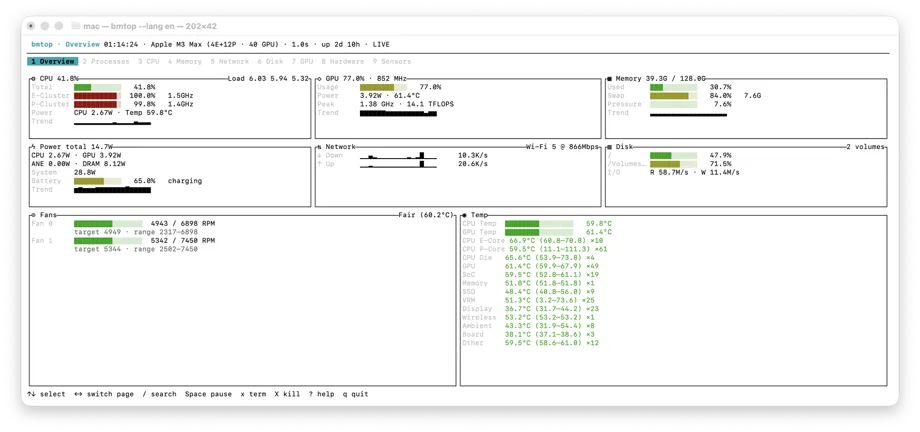
BetterMac bmtop overview showing Apple Silicon power, temperatures, and system resources
Native terminal overview · BetterMac bmtop

Local-firstNo telemetry or runtime network calls; machine-readable output redacts hardware identifiers by default.

Apple Silicon telemetryRead SoC power, frequency, temperature, fans, and thermal pressure.

Process energySort Energy Impact and estimated watts, with the attribution-model boundary stated plainly.

ScriptableStable JSON/JSONL output; CSV is also available for processes and network.

Core capabilities

Inspect processes, CPU, memory, network, disk, GPU, hardware, and sensors in the terminal; Apple Silicon adds power, frequency, temperature, and fan telemetry.

01

Process view and control

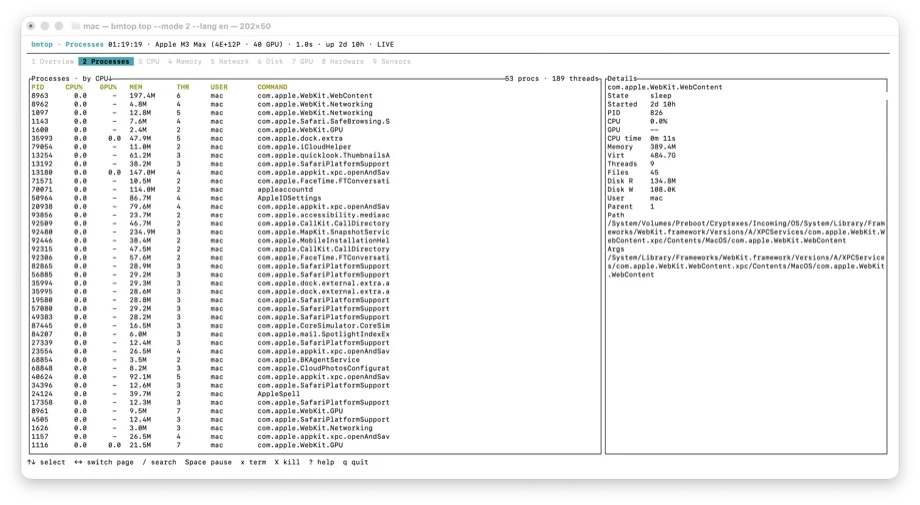
Keep top/htop habits for sorting, filtering, search, tree view, and thread inspection. Ending a process always requires your explicit confirmation, then PID and start time are revalidated.

  • CPU, GPU, memory, disk I/O, and thread details
  • Energy Impact and estimated-watt sorting
  • SIGTERM / SIGKILL require confirmation; PID 0, PID 1, and bmtop are protected
02

Native hardware telemetry

On Apple Silicon, read E/P clusters, CPU/GPU/ANE/DRAM power, temperatures, fans, and thermal pressure. On Intel or when a capability is unavailable, SoC data is omitted and the UI degrades gracefully.

  • IOReport, IOKit/SMC, and capability probes
  • GPU frequency, power, peak frequency, and theoretical TFLOPS
  • Network links, Thunderbolt, RDMA, and optional display FPS
03

Panels and machine output

Overview, processes, CPU, memory, network, disk, GPU, hardware, and sensors are available as pages and explicit CLI subcommands.

  • JSON schema version 2, UTC RFC 3339 timestamps, and capabilities
  • One-shot, fixed-count, or continuous watch sampling
  • Sysexits-style exit codes and Bash, Zsh, and Fish completions

Use cases

From investigation to automation

Investigate performance

Move from the system overview into processes, threads, CPU, GPU, memory, and thermal pressure in one TUI to find the work consuming resources.

Monitor Apple Silicon

Use the native panels when you need SoC power, E/P clusters, fans, or sensor readings, with capability probes deciding what is available.

Feed scripts

Hand fixed-count or continuous-watch JSON, JSONL, or CSV output to shell scripts, monitoring jobs, or diagnostics.

Boundaries

Keep the signal explainable

  • Estimated watts allocates measured package power by process share; it is an attribution model, not a direct per-process measurement.
  • Apple Silicon-specific SoC, ANE, or DRAM fields are omitted on Intel Macs or when system counters are unavailable.
  • Routine collection needs no administrator access; only explicit enhanced samples or operations on another user's process invoke a constrained sudo flow.

Permissions & privacy

Monitoring stays on your Mac

Normal collection needs no administrator access or daemon. bmtop has no telemetry or runtime network client, and JSON redacts hardware identifiers by default. Only an explicitly requested enhanced sample or operation on another user's process invokes the constrained sudo path; the TUI never runs as root and never stores passwords.

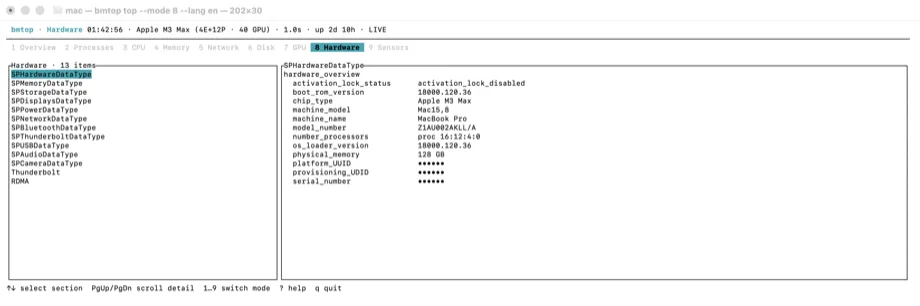
BetterMac bmtop hardware view showing Mac hardware, Thunderbolt topology, and redacted identifiers

See energy, and understand its boundary

See energy, and understand its boundary

Energy Impact uses Apple's pmenergy coefficients and process resource statistics. Estimated watts allocates measured CPU/GPU package power by process share; it is an attribution model, not a direct per-process measurement, and it is omitted without Apple Silicon SoC data.

BetterMac bmtop process view showing CPU, GPU, memory, and sortable per-process energy data

Start three ways

Install with Homebrew, download the universal binary from GitHub Releases, or install from the Rust source. Stable releases include both Apple silicon and Intel slices.

GitHub Releases

https://github.com/BetterMacNet/bmtop/releases/latest/download/bmtop-macos-universal.tar.gz

Download universal binary

Rust

git clone https://github.com/BetterMacNet/bmtop.git && cd bmtop && cargo install --path crates/bmtopInstall from source

Read the MIT License · Open GitHub repository