Better Share app icon

LAN file sharing

Better Share

LAN file sharing for the Mac: discover devices automatically, send with one click, bind trusted devices, share from the clipboard, and hand off to system AirDrop between Apple devices. Devices without the app send and receive in a browser through a QR code or short code.

Available now · Free · macOS 14 or later · Version 1.0.0 · Free

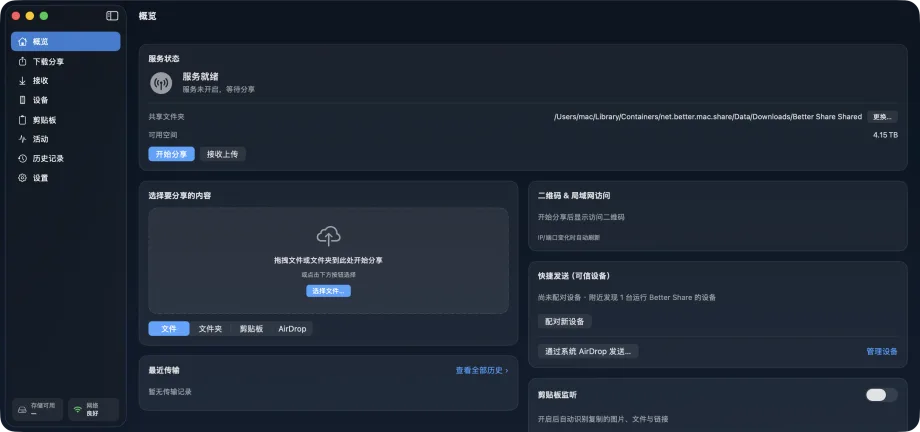
Better Share overview showing service status, drag-and-drop selection, the QR code and LAN access card, quick send, and clipboard monitoring
Overview page · Better Share

Local-firstNo servers, no analytics, no crash reporting, and no internet requests; data moves only inside your LAN.

Trusted device bindingBind with a QR scan plus a 6-digit verification code; pairing keys stay in the macOS Keychain and direct transfers are TLS-PSK encrypted.

Browser send and receiveA QR code or short code opens the share page for downloads or uploads, with an optional guest PIN; guest uploads wait for your confirmation by default.

Resumable transfersChunked transfer, resume after interruption, SHA-256 verification, review before receiving, and the quarantine attribute after.

Three channels

Three channels reach every device: encrypted direct transfer between Macs running Better Share, a browser page for phones and PCs, and a one-click AirDrop hand-off for Apple devices.

01

Direct transfer

Two Macs running Better Share find each other over Bonjour. Bind once with a QR scan and a matching 6-digit code, then pick files on the Overview page and click a device to send.

  • Bonjour discovery with live nearby refresh and online status for bound devices
  • TLS-PSK encryption with mutual authentication; pairing keys live in the macOS Keychain
  • Chunked transfer, bitmap resume, and atomic write after SHA-256 verification
02

Browser

A phone, tablet, or Windows PC without the app scans a QR code or enters a short code to download what you share, or to upload files to your Mac from the browser.

  • One-time link tokens with expiry and an optional guest PIN
  • Guest upload policy: require confirmation, accept automatically, or refuse
  • Pin the share to one network interface, with a warning when other subnets cannot reach it
03

AirDrop

When the other side is an iPhone, iPad, or Mac, switch from the send panel to system AirDrop without choosing the files again.

  • Reuses the current selection
  • Calls the system sharing service and does not enumerate AirDrop receivers
  • Sits alongside direct transfer and the browser channel

Use cases

Choose the right path for each file

Transfer between Macs

Discover and bind two Macs on the same LAN, then send selected files over an encrypted direct transfer for everyday device-to-device work.

Reach devices without the app

Let a phone, tablet, or Windows PC scan a QR code or enter a short code to download or upload in a browser without installing Better Share.

Hand off to AirDrop

When the other side is an Apple device, reuse the current selection and switch from the send panel to the familiar system AirDrop path.

Boundaries

Make the security boundary visible

  • The browser channel serves HTTP only inside the LAN; prefer TLS-PSK direct transfer between bound Macs for sensitive content.
  • The extension-based risk hint is not a virus scan and does not replace malware detection; network files receive the macOS quarantine attribute.
  • Better Share provides no cloud relay or internet transfer, and guest uploads remain limited by size, directory, type, and review policy.

Privacy & security

Data stays on your LAN

Better Share has no servers, no analytics, no crash reporting, and makes no internet requests. Bonjour broadcasts only an editable display name (your Mac's name by default), the first 8 characters of a random device id, capabilities, and the OS type; no hardware identifiers. History is stored on your Mac (browser uploads record the browser name and LAN IP) and can be cleared or exported as CSV / JSON at any time.

  • Pairing keys stay in the macOS Keychain and are not synced through iCloud
  • Review before receiving: per-file extension-based risk hint, destination and free space, conflict policy, and partial accept
  • Files from the network get the macOS quarantine attribute
  • Clipboard monitoring is off by default; when on, only metadata is read, and password-manager items and secret-looking text are suppressed
Read the privacy policy
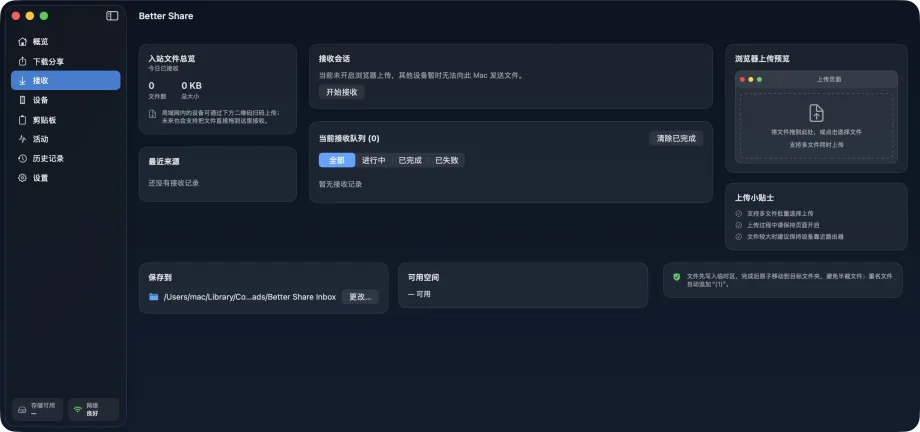
Better Share receive page showing the inbound overview, receive session, filtered receive queue, browser upload preview, and save location

Pages

Eight pages

From Overview to Settings, each page does one job.

  • Overview · Service status, drag-and-drop selection, QR code, quick send, and recent transfers
  • Download share · Mount a folder on LAN HTTP for browser downloads
  • Receive · Browser upload QR code, review queue, save location, and free space
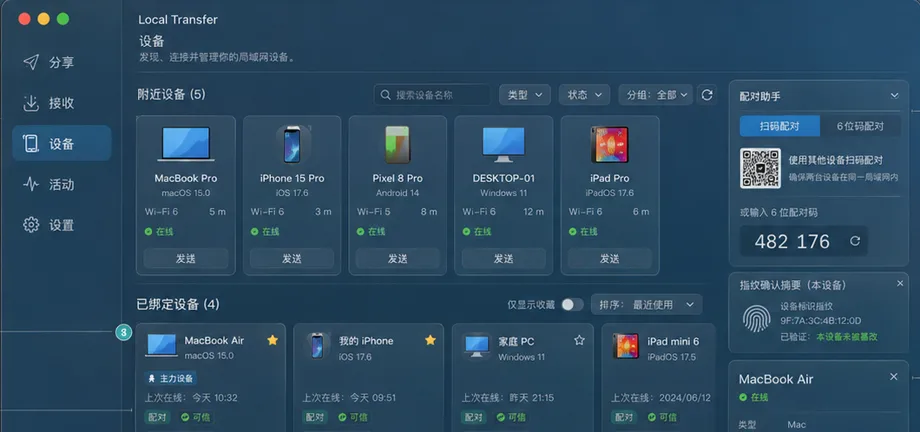
  • Devices · Nearby devices, bound devices, favorites, and the pairing assistant
  • Clipboard · Monitoring status, candidates, rules, and the event log
  • Activity · Transfers in progress, throughput chart, and today's totals
  • History · Local transfer records you can filter, clear, and export as CSV / JSON
  • Settings · Network, security, clipboard, storage, and privacy
Better Share devices page showing nearby devices, bound devices, the QR pairing assistant, and device details

Help

Frequently asked questions

What if the other device does not have Better Share?

Use the browser channel. Once a share is running, the other person scans the QR code with a phone or PC, or enters the short code on the same LAN, and downloads or uploads in the browser with nothing to install.

How does device binding work?

Open the pairing assistant on the Devices page, scan the code with the other Mac, then compare the same 6-digit verification code on both sides and confirm. The resulting pairing key is stored in the macOS Keychain, and direct transfers between the two devices are TLS-PSK encrypted and mutually authenticated from then on.

Does Better Share upload my files to the cloud?

No. There are no servers, no accounts, and no internet requests. Files travel only between your Mac and the other device, and the browser share page is served by your Mac directly on the LAN.

What can guests upload?

That is your call. The guest upload policy can require confirmation, accept automatically, or refuse; it requires confirmation by default. Before receiving, you see each file's name, size, extension-based risk hint, destination, and free space, and you can accept only some of them.

Is the risk column a virus scan?

No. The risk column is a heuristic based only on the file extension, there to flag executables and scripts; it does not replace malware scanning. Files from the network receive the macOS quarantine attribute, so the system asks again the first time they are opened.

Does clipboard monitoring read my clipboard?

Monitoring is off by default. When on, it reads only the type, size, filename, and the first 80 characters of text to show a prompt; items from password managers and text that looks like keys, certificates, or one-time codes are suppressed. Nothing is shared until you click generate link or send.

Why does the share link not open on another network?

A browser share can be pinned to one network interface, and the link is reachable only on that interface's subnet. Better Share warns when other subnets cannot reach it; connect the other device to the same network, or pin a different interface.

Does Better Share cost anything?

It is free, with no in-app purchases.

Need help?

Read the product guides, or reach us through the support center and email.