

BetterMac bmtop
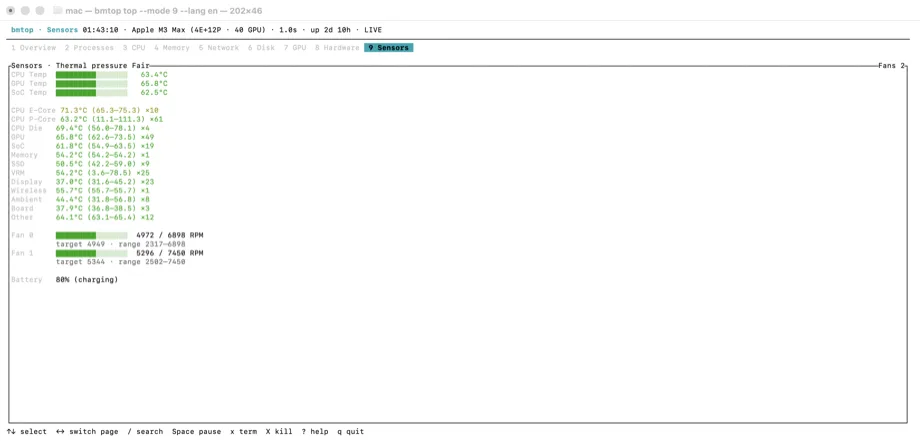
How do I see CPU temperature on Apple Silicon in Terminal?
Read Apple Silicon heat and power context next to your Terminal logs.
The situation
A developer on M-series hardware wants heat and power context while stress-testing a build, ML job, or browser tab storm — preferably in Terminal next to the logs.
What usually goes wrong
`powermetrics` output is dense and easy to misread. Many GUI menu-bar apps help, but headless or SSH sessions need a terminal tool. Cross-platform monitors often report wrong or zero temps on Apple Silicon.
A clearer path
- Run bmtop on the Mac (local or SSH).
- Read process load alongside the SoC telemetry the current bmtop release exposes.
- Use that to decide whether to throttle work, close helpers, or keep going.
Product used
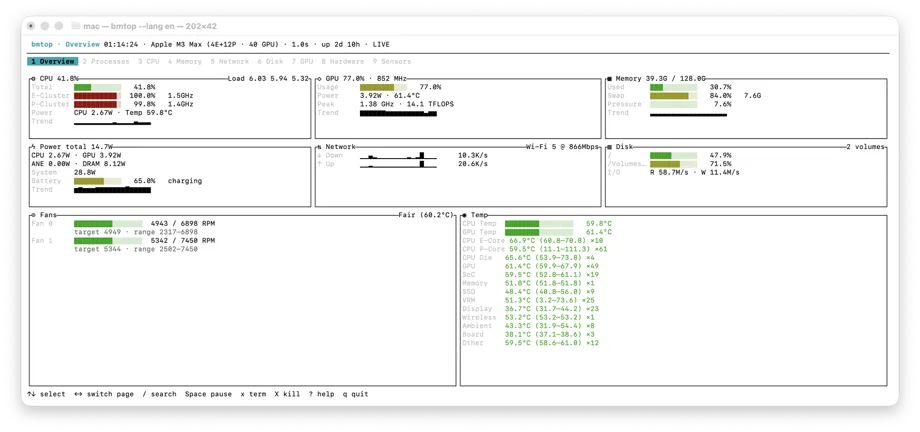
BetterMac bmtop
bmtop Apple Silicon SoC telemetry path (see current version notes on the product page).
Open product page