

Better Calc Pro worksheet: line references, variables, Chinese input, and precision
The worksheet keeps every line you typed and every value in between on screen. It shares the full-precision Decimal engine with the calculator; it just turns one calculation into a page you can go back and change.
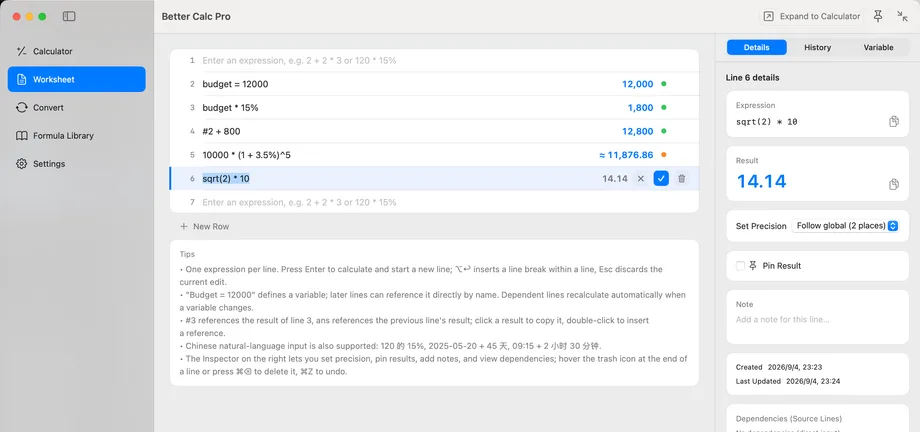
Calculate line by line
One expression per line. Press Return to calculate and open the next line; ⌥↩ inserts a line break within a line, and Esc discards the current edit. A dim live preview follows along as you type.
From the Calculator page, ⌘E expands the current expression into the Worksheet; ⌘N opens a new line at any time. The status bar shows the line count, variable count, and save state, and the worksheet is saved as JSON in the app sandbox container on your Mac.
Line references
Refer to the result of line 3 as #3, and to the previous line's result as ans. Click a result to copy it; double-click to insert its #N reference into the line you are editing.
When a referenced line changes, the lines that reference it recalculate and nothing else moves. The Dependencies (source lines) card in the inspector's Details tab lists the lines the current line refers to and jumps to them.
Variables
Writing budget = 12000 defines a variable that any later line can use by name, for example budget * 15%.
When a variable's value changes, the lines that depend on it recalculate. The inspector's Variables tab lists every variable; ⇧⌘V creates one, and deleting a variable can be undone with ⌘Z.
Chinese natural language
Everyday Chinese phrasings are calculated directly: 120 的 15% 是多少, or 含税价 899 元,税率 13%,不含税价是多少. Dates and times work the same way: 2026-08-27 + 45 天, or 09:15 + 2 小时 30 分钟.
Anything unrecognized falls back to ordinary expression parsing with a clear syntax error. Everything runs on your Mac with no cloud model, so it works offline. The default calculation mode in Settings switches between natural language and strict expressions.
Precision, pinning, and notes
Values are held internally as Decimal at full precision and formatted for display according to the precision setting; each line can override it in the inspector. Right-click a result, or use the inspector, to copy the full-precision value; the difference between displayed and full value is always visible.
Pin Result freezes the line's value so it no longer follows upstream changes; notes are saved with the line. Deleting a line asks for confirmation (⌘⌫) and can be undone with ⌘Z.
Better Calc Pro
Download from the Mac App Store.