

Better Share browser sharing and security settings
The browser channel serves devices without Better Share; native direct transfer serves bound Macs. The two channels have different security boundaries, and this guide covers each.
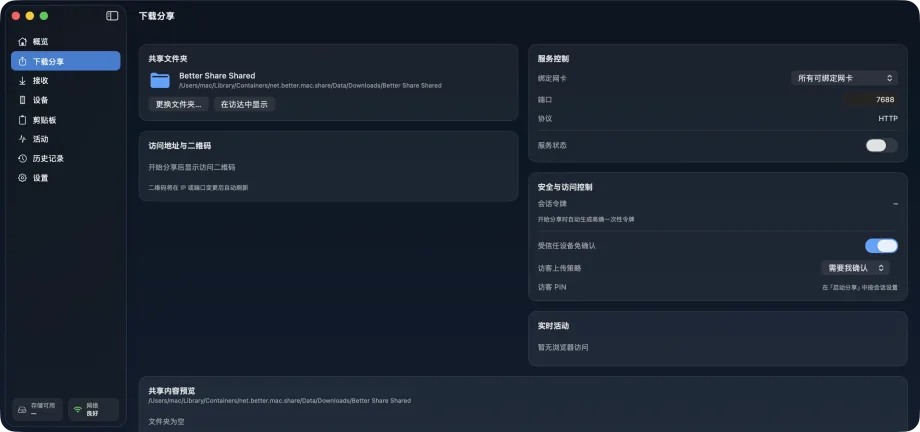
Share with a QR code or short code
When you start a share from the Overview or Download share page, Better Share generates a LAN link and its QR code. The link carries a one-time random token and an expiry.
The other person scans it and opens the share page in a browser to download what you shared, or to upload files to your Mac if you allow it. The 6-digit short code is for a human check that both sides opened the same share.
Files and folders selected on the Overview page are mounted onto the share session without copying data; remove an item and its old link stops working immediately.
Guest PIN and upload policy
A share can require a guest PIN, which visitors must enter before the page opens.
The guest upload policy has three settings: require confirmation (the default, into the review queue), accept automatically, or refuse. Whichever you choose, the maximum file, directory, and type limits still apply, and received files get the macOS quarantine attribute.
- Require confirmation: every upload waits for your review on the Receive page
- Accept automatically: for trusted sources such as your own phone
- Refuse: the share page allows downloads only
Bind a network interface
When your Mac is on several networks at once (wired plus Wi-Fi, or a virtual machine adapter), pin the share to one interface so the link is reachable only on that interface's subnet.
Better Share warns when it detects that other subnets cannot reach the link. Connect the other device to the same network, or pin a different interface.
Encryption for direct transfer
Direct transfer between Macs uses TLS-PSK: the pairing key agreed during binding exists only in the macOS Keychain of the two devices, and the handshake completes mutual authentication and encryption.
The browser channel is served over HTTP inside the LAN, with access controlled by one-time tokens, expiry, the guest PIN, and failure rate limiting. Use it on networks you trust, and prefer direct transfer between bound devices for sensitive content.
Privacy boundary of clipboard monitoring
Clipboard monitoring is off by default. When on, it reads only metadata (type, size, filename, and the first 80 characters of text); items from password managers and text that looks like keys, certificates, or one-time codes are suppressed.
Each candidate offers four actions: generate link, send to device, open source, and ignore. Nothing is shared until you click. The event log stays on your Mac and can be cleared at any time.
Better Share
Download from the Mac App Store.